Podman Desktop with Remote Podman Machines
October 11, 2026
With macOS 27 being the last version of macOS that will use Rosetta, I found myself in a quandry: I run containers on my TrueNAS box but build them on my mac. Right now I can do this by using Rosetta with Podman so that I can build linux/amd64 images on Apple Silicon, but with the next version of macOS that won’t work. I also had some issues with Podman publishing to my local Gitea container registry today so I figured it was as good a time as any to get ahead of the change next year.
I have a Fedora VM running on my TrueNAS box so that’s where we’ll install Podman to use remotely from Podman Desktop on my Mac.
On the Fedora box, we need to install Podman and create the sockets to talk to Podman over SSH. This will allow us to build, run, and otherwise manager containers that will be running on the remote Linux box, and not a local virtual machine.
sudo dnf install -y podman-machine
Next we’ll create the sockets and ensure that the will be available when the user is not logged in:
$ systemctl --user enable --now podman.socket
Created symlink '/home/vincent/.config/systemd/user/sockets.target.wants/podman.socket' → '/usr/lib/systemd/user/podman.socket'.

$ sudo loginctl enable-linger "${USER}"

$ systemctl --user status podman.socket
● podman.socket - Podman API Socket
     Loaded: loaded (/usr/lib/systemd/user/podman.socket; enabled; preset: disabled)
     Active: active (listening) since Sun 2026-10-11 14:00:28 MDT; 19s ago
 Invocation: 67ab8b5b552c40ef80753df7ca7ffa35
   Triggers: ● podman.service
       Docs: man:podman-system-service(1)
     Listen: /run/user/1000/podman/podman.sock (Stream)

Oct 11 14:00:28 fedora.mydomain.com systemd[55927]: Listening on podman.socket - Podman API Socket.

$ echo ${XDG_RUNTIME_DIR}/podman/podman.sock
/run/user/1000/podman/podman.sock
We may want to use a privileged (root user) connection to the machine as well. To do this, we’ll enable the system-wide Podman socket and verify it:
$ sudo systemctl enable --now podman.socket
[sudo] password for vincent:
Created symlink '/etc/systemd/system/sockets.target.wants/podman.socket' → '/usr/lib/systemd/system/podman.socket'.

$ sudo systemctl status podman.socket
● podman.socket - Podman API Socket
     Loaded: loaded (/usr/lib/systemd/system/podman.socket; enabled; preset: disabled)
     Active: active (listening) since Sun 2026-10-11 14:13:31 MDT; 8s ago
 Invocation: 319ae18beee142358c9facea13c3e182
   Triggers: ● podman.service
       Docs: man:podman-system-service(1)
     Listen: /run/podman/podman.sock (Stream)

Oct 11 14:13:31 fedora.mydomain.com systemd[1]: Listening on podman.socket - Podman API Socket.
Note: I would not recommend doing this unless you absolutely find you need to. There are some limitations and the Podman commands seem to not be able to be contrained to just the podman command, so giving access to the root account, remotely, for privileged Podman access is probably a bad idea!
Finally, create a new Podman machine on the Linux system:
podman machine init
Next, ensure you have an SSH key on the system you can login without a password. It is recommended to create a new key specifically for this:
$ ssh-keygen -t ed25519 -f ~/.ssh/podman_remote
Generating public/private ed25519 key pair.
...

$ ssh-copy-id -i ~/.ssh/podman_remote.pub [email protected]

$ ssh -i ~/.ssh/podman_remote [email protected] podman info
host:
  arch: amd64
...
Now you need to add, on the client, the remote connections to make the local Podman aware of the remote Podman system.
podman system connection add fedora --identity ~/.ssh/podman_remote ssh://[email protected]/run/user/1000/podman/podman.sock
Do a quick test to ensure we can connect:
$ podman --connection fedora info
Client:
  APIVersion: 6.1.3
  BuildOrigin: brew
  Built: 1790686802
  BuiltTime: Tue Sep 29 07:00:02 2026
  GitCommit: ""
  GoVersion: go1.27.1
  Os: darwin
  OsArch: darwin/arm64
  Version: 6.1.3
host:
  arch: amd64
...
Now we’ll set the default connection to the remote:
$ podman system connection default fedora

$ podman system connection list
Name                         URI                                                              Identity                                                      Default     ReadWrite
fedora                       ssh://[email protected]:22/run/user/1000/podman/podman.sock  /Users/vincent/.ssh/podman_remote                              true        true
podman-machine-default       ssh://[email protected]:61552/run/user/502/podman/podman.sock             /Users/vincent/.local/share/containers/podman/machine/machine  false       true
podman-machine-default-root  ssh://[email protected]:61552/run/podman/podman.sock                      /Users/vincent/.local/share/containers/podman/machine/machine  false       true
At this point, we can see if we can start a remote container from the client. On the mac, we’ll ask to start an nginx container and see if it’s running:
$ podman --connection fedora run -d --name web -p 8080:80 nginx
Resolved "nginx" as an alias (/etc/containers/registries.conf.d/000-shortnames.conf)
...

$ podman --connection fedora ps
CONTAINER ID  IMAGE                           COMMAND               CREATED         STATUS         PORTS                 NAMES
8f027a7893aa  docker.io/library/nginx:latest  nginx -g daemon o...  20 seconds ago  Up 20 seconds  0.0.0.0:8080->80/tcp  web
It worked! One final step for the Podman Desktop GUI. In Settings navigate to Resources and you will see the Podman resource and, likely, you will see it running the local Podman Machine. Click the gear icon to get to the preferences and ensure that under Remote the Load remote system connections (ssh) is enabled. When you go back to the Resources settings, you should see something like this:
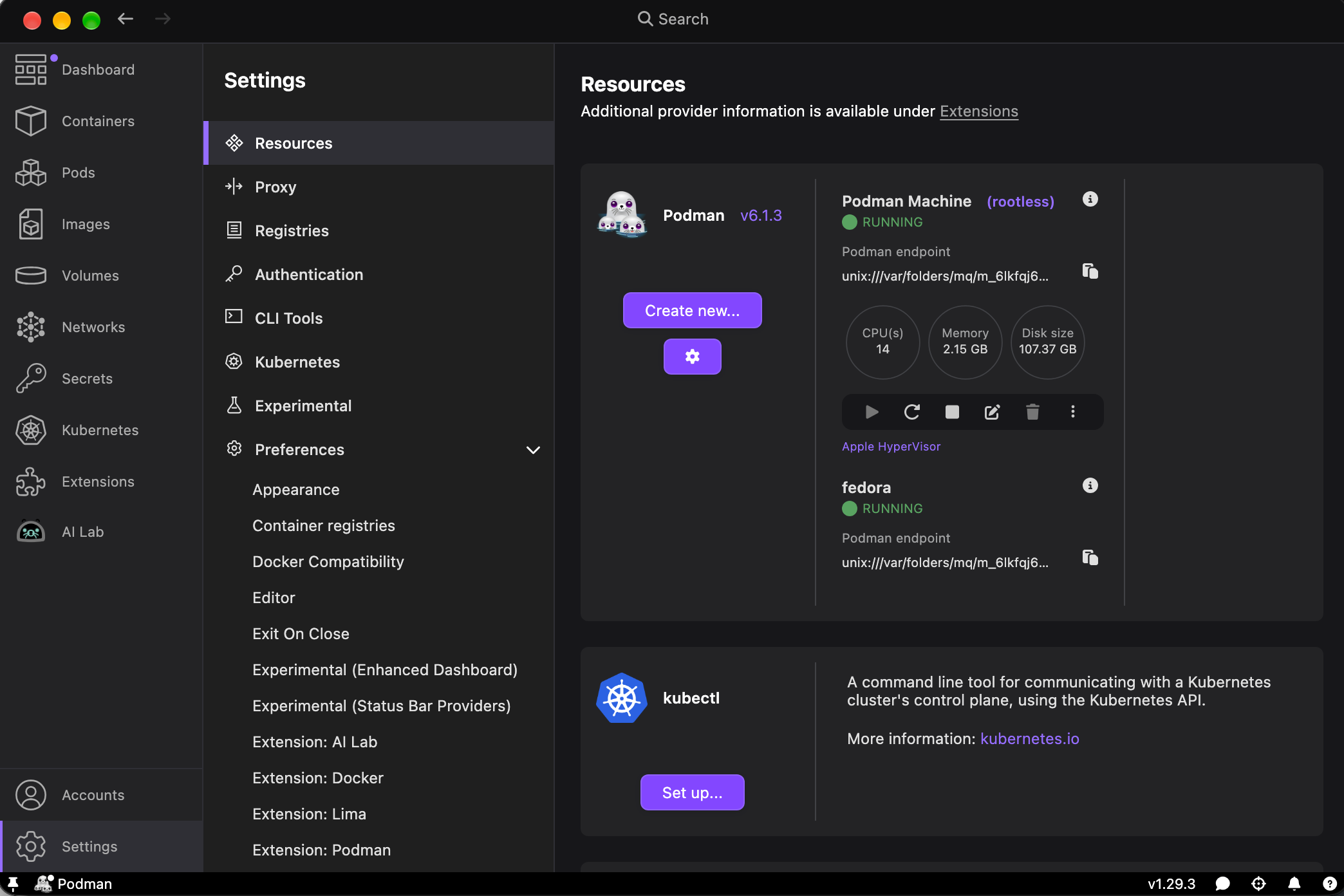
You can have more than one Podman Machine so you can keep both the local machine and the remote, or simply rely on the remote machine.
With the macOS 27 upgrade, Rosetta is removed so you have to manually reinstall it with softwareupdate --install-rosetta. If you did that solely for Podman, there’s no documented and supported way of removing Rosetta so it’ll stick around until macOS 28 is released and it’s fully and finally removed.